# Controle de expedição

# MDF-e Gerenciamento

![image.png](http://conhecimento.olimpustecnologia.com.br/uploads/images/gallery/2025-05/scaled-1680-/YJWimage.png)

#### <span style="color: rgb(52, 73, 94);">**MDFe - Gerenciamento**</span>

<div align="center" class="MsoNormal" id="bkmrk--1" style="margin-bottom: .0001pt; text-align: center; line-height: normal;">---

</div>#### [**<span style="font-size: 18.0pt; font-family: 'Times New Roman',serif; mso-fareast-font-family: 'Times New Roman'; mso-font-kerning: 0pt; mso-ligatures: none; mso-fareast-language: PT-BR;">1. Cadastro de Motorista</span>**](http://olimpustecnologia.2ti.com.br/books/cadastros/page/manutencao-cadastrar-funcionarios)

**<span style="font-size: 13.5pt; font-family: 'Times New Roman',serif; mso-fareast-font-family: 'Times New Roman'; mso-font-kerning: 0pt; mso-ligatures: none; mso-fareast-language: PT-BR;">Cadastro de Novo Motorista</span>**

1. <span style="font-size: 12.0pt; font-family: 'Times New Roman',serif; mso-fareast-font-family: 'Times New Roman'; mso-font-kerning: 0pt; mso-ligatures: none; mso-fareast-language: PT-BR;">Na tela "Funcionários", clique no ícone **"Inserir"** localizado no canto superior esquerdo.</span>
2. <span style="font-size: 12.0pt; font-family: 'Times New Roman',serif; mso-fareast-font-family: 'Times New Roman'; mso-font-kerning: 0pt; mso-ligatures: none; mso-fareast-language: PT-BR;">Preencha os seguintes campos obrigatórios:</span>

- **<span style="font-size: 12.0pt; font-family: 'Times New Roman',serif; mso-fareast-font-family: 'Times New Roman'; mso-font-kerning: 0pt; mso-ligatures: none; mso-fareast-language: PT-BR;">Nome Reduzido</span>**
- **<span style="font-size: 12.0pt; font-family: 'Times New Roman',serif; mso-fareast-font-family: 'Times New Roman'; mso-font-kerning: 0pt; mso-ligatures: none; mso-fareast-language: PT-BR;">Nome Completo</span>**
- **<span style="font-size: 12.0pt; font-family: 'Times New Roman',serif; mso-fareast-font-family: 'Times New Roman'; mso-font-kerning: 0pt; mso-ligatures: none; mso-fareast-language: PT-BR;">CPF</span>**
- **<span style="font-size: 12.0pt; font-family: 'Times New Roman',serif; mso-fareast-font-family: 'Times New Roman'; mso-font-kerning: 0pt; mso-ligatures: none; mso-fareast-language: PT-BR;">Filial</span>**
- **<span style="font-size: 12.0pt; font-family: 'Times New Roman',serif; mso-fareast-font-family: 'Times New Roman'; mso-font-kerning: 0pt; mso-ligatures: none; mso-fareast-language: PT-BR;">Tipo:</span>**<span style="font-size: 12.0pt; font-family: 'Times New Roman',serif; mso-fareast-font-family: 'Times New Roman'; mso-font-kerning: 0pt; mso-ligatures: none; mso-fareast-language: PT-BR;"> Selecione a função **"Motorista"**</span>
- <span style="font-size: 12.0pt; font-family: 'Times New Roman',serif; mso-fareast-font-family: 'Times New Roman'; mso-font-kerning: 0pt; mso-ligatures: none; mso-fareast-language: PT-BR;">Salve o cadastro.</span>

<div align="center" class="MsoNormal" id="bkmrk--2" style="margin-bottom: .0001pt; text-align: center; line-height: normal;">---

</div>#### [**<span style="font-size: 18.0pt; font-family: 'Times New Roman',serif; mso-fareast-font-family: 'Times New Roman'; mso-font-kerning: 0pt; mso-ligatures: none; mso-fareast-language: PT-BR;">2. Cadastro de Transporte</span>**](http://olimpustecnologia.2ti.com.br/books/cadastros/page/cadastro-de-transportadora)

<span style="font-size: 12.0pt; font-family: 'Times New Roman',serif; mso-fareast-font-family: 'Times New Roman'; mso-font-kerning: 0pt; mso-ligatures: none; mso-fareast-language: PT-BR;">O transporte pode ser realizado por uma transportadora contratada ou por um veículo próprio da empresa.</span>

##### **<span style="font-size: 13.5pt; font-family: 'Times New Roman',serif; mso-fareast-font-family: 'Times New Roman'; mso-font-kerning: 0pt; mso-ligatures: none; mso-fareast-language: PT-BR;">Acesso ao Cadastro</span>**

1. <span style="font-size: 12.0pt; font-family: 'Times New Roman',serif; mso-fareast-font-family: 'Times New Roman'; mso-font-kerning: 0pt; mso-ligatures: none; mso-fareast-language: PT-BR;">No menu principal, clique em **"Incluir"** no canto superior esquerdo.</span>
2. <span style="font-size: 12.0pt; font-family: 'Times New Roman',serif; mso-fareast-font-family: 'Times New Roman'; mso-font-kerning: 0pt; mso-ligatures: none; mso-fareast-language: PT-BR;">A tela de cadastro de novo veículo será exibida.</span>

##### **<span style="font-size: 13.5pt; font-family: 'Times New Roman',serif; mso-fareast-font-family: 'Times New Roman'; mso-font-kerning: 0pt; mso-ligatures: none; mso-fareast-language: PT-BR;">Preenchimento de Dados Obrigatórios</span>**

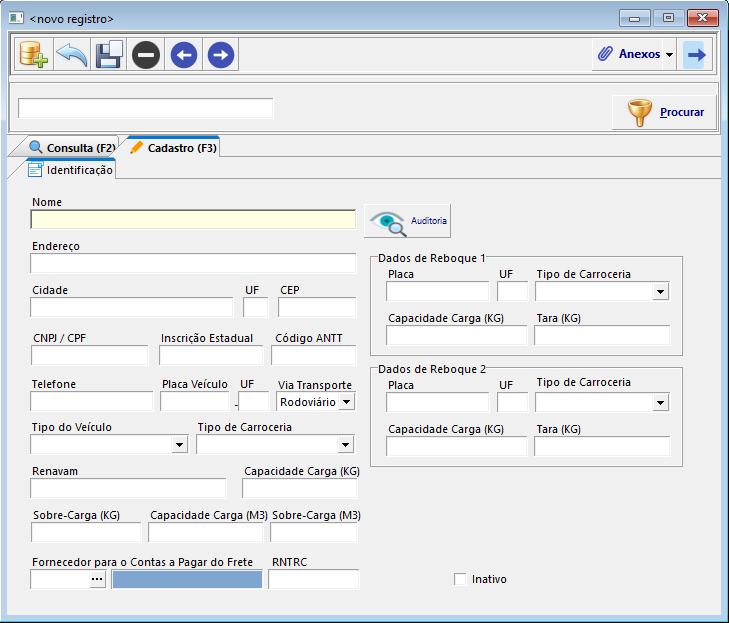
1. **<span style="font-size: 12.0pt; font-family: 'Times New Roman',serif; mso-fareast-font-family: 'Times New Roman'; mso-font-kerning: 0pt; mso-ligatures: none; mso-fareast-language: PT-BR;">Nome: </span>**Se for uma uma transportadora, insira o nome da empresa. <span style="font-size: 12.0pt; font-family: 'Times New Roman',serif; mso-fareast-font-family: 'Times New Roman'; mso-font-kerning: 0pt; mso-ligatures: none; mso-fareast-language: PT-BR;">Caso seja veículo próprio, insira a identificação do veículo (exemplo: "Caminhão Branco").</span>
2. **<span style="font-size: 12.0pt; font-family: 'Times New Roman',serif; mso-fareast-font-family: 'Times New Roman'; mso-font-kerning: 0pt; mso-ligatures: none; mso-fareast-language: PT-BR;">Endereço</span>**
3. **<span style="font-size: 12.0pt; font-family: 'Times New Roman',serif; mso-fareast-font-family: 'Times New Roman'; mso-font-kerning: 0pt; mso-ligatures: none; mso-fareast-language: PT-BR;">Cidade</span>**
4. **<span style="font-size: 12.0pt; font-family: 'Times New Roman',serif; mso-fareast-font-family: 'Times New Roman'; mso-font-kerning: 0pt; mso-ligatures: none; mso-fareast-language: PT-BR;">UF</span>**
5. **<span style="font-size: 12.0pt; font-family: 'Times New Roman',serif; mso-fareast-font-family: 'Times New Roman'; mso-font-kerning: 0pt; mso-ligatures: none; mso-fareast-language: PT-BR;">CEP</span>**
6. **<span style="font-size: 12.0pt; font-family: 'Times New Roman',serif; mso-fareast-font-family: 'Times New Roman'; mso-font-kerning: 0pt; mso-ligatures: none; mso-fareast-language: PT-BR;">Placa do Veículo</span>**
7. **<span style="font-size: 12.0pt; font-family: 'Times New Roman',serif; mso-fareast-font-family: 'Times New Roman'; mso-font-kerning: 0pt; mso-ligatures: none; mso-fareast-language: PT-BR;">Tipo de Carroceria</span>**
8. **<span style="font-size: 12.0pt; font-family: 'Times New Roman',serif; mso-fareast-font-family: 'Times New Roman'; mso-font-kerning: 0pt; mso-ligatures: none; mso-fareast-language: PT-BR;">Tipo do Veículo</span>**
9. **<span style="font-size: 12.0pt; font-family: 'Times New Roman',serif; mso-fareast-font-family: 'Times New Roman'; mso-font-kerning: 0pt; mso-ligatures: none; mso-fareast-language: PT-BR;">Renavam</span>**

##### **<span style="font-size: 13.5pt; font-family: 'Times New Roman',serif; mso-fareast-font-family: 'Times New Roman'; mso-font-kerning: 0pt; mso-ligatures: none; mso-fareast-language: PT-BR;">Cadastro de Reboque</span>**

- <span style="font-size: 12.0pt; font-family: 'Times New Roman',serif; mso-fareast-font-family: 'Times New Roman'; mso-font-kerning: 0pt; mso-ligatures: none; mso-fareast-language: PT-BR;">Para caminhões com reboque, preencha os dados do reboque no campo lateral **"Dados de Reboque 1 e Dados de Reboque 2"**.</span>

[![image.png](http://conhecimento.olimpustecnologia.com.br/uploads/images/gallery/2025-06/scaled-1680-/GViimage.png)](http://conhecimento.olimpustecnologia.com.br/uploads/images/gallery/2025-06/GViimage.png)

<div align="center" class="MsoNormal" id="bkmrk--4" style="margin-bottom: .0001pt; text-align: center; line-height: normal;">---

</div>#### **<span style="font-size: 18.0pt; font-family: 'Times New Roman',serif; mso-fareast-font-family: 'Times New Roman'; mso-font-kerning: 0pt; mso-ligatures: none; mso-fareast-language: PT-BR;">3. Criação de um Novo MDF-e</span>**

##### **<span style="font-size: 13.5pt; font-family: 'Times New Roman',serif; mso-fareast-font-family: 'Times New Roman'; mso-font-kerning: 0pt; mso-ligatures: none; mso-fareast-language: PT-BR;">Acesso ao Módulo</span>**

1. <span style="font-size: 12.0pt; font-family: 'Times New Roman',serif; mso-fareast-font-family: 'Times New Roman'; mso-font-kerning: 0pt; mso-ligatures: none; mso-fareast-language: PT-BR;">No menu principal, acesse:</span>

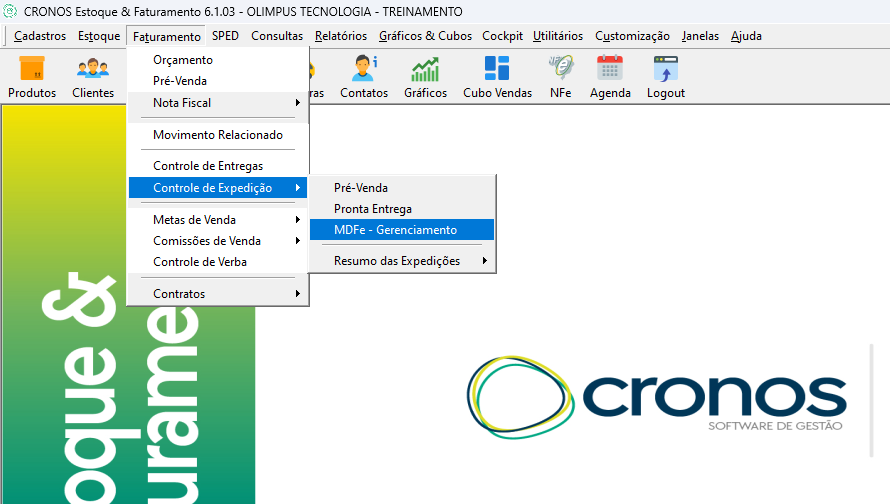
- **<span style="font-size: 12.0pt; font-family: 'Times New Roman',serif; mso-fareast-font-family: 'Times New Roman'; mso-font-kerning: 0pt; mso-ligatures: none; mso-fareast-language: PT-BR;">Faturamento &gt; Controle de Expedição &gt; MDF-e – Gerenciamento</span>**

**<span style="font-size: 12.0pt; font-family: 'Times New Roman',serif; mso-fareast-font-family: 'Times New Roman'; mso-font-kerning: 0pt; mso-ligatures: none; mso-fareast-language: PT-BR;">[![image.png](http://olimpustecnologia.2ti.com.br/uploads/images/gallery/2025-04/scaled-1680-/fHTimage.png)](http://olimpustecnologia.2ti.com.br/uploads/images/gallery/2025-04/fHTimage.png)</span>**

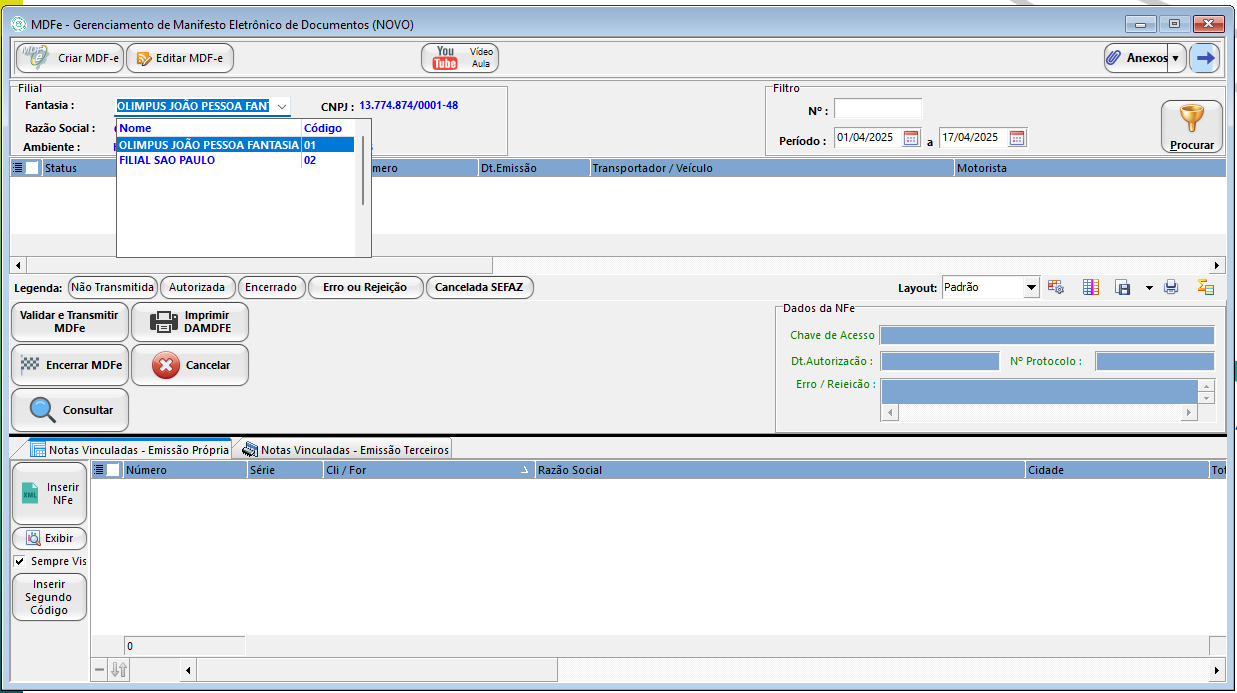
- <span style="font-size: 12.0pt; font-family: 'Times New Roman',serif; mso-fareast-font-family: 'Times New Roman'; mso-font-kerning: 0pt; mso-ligatures: none; mso-fareast-language: PT-BR;">Selecione a **filial** para emissão do MDF-e.</span>

[![image.png](http://olimpustecnologia.2ti.com.br/uploads/images/gallery/2025-04/scaled-1680-/TBXimage.png)](http://olimpustecnologia.2ti.com.br/uploads/images/gallery/2025-04/TBXimage.png)

##### **<span style="font-size: 13.5pt; font-family: 'Times New Roman',serif; mso-fareast-font-family: 'Times New Roman'; mso-font-kerning: 0pt; mso-ligatures: none; mso-fareast-language: PT-BR;">Criação do MDF-e</span>**

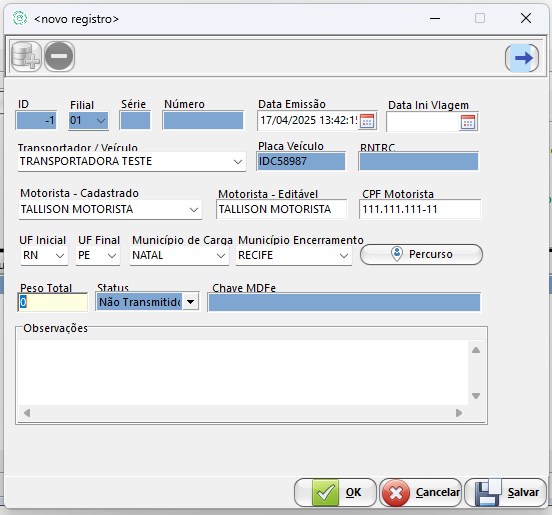
1. <span style="font-size: 12.0pt; font-family: 'Times New Roman',serif; mso-fareast-font-family: 'Times New Roman'; mso-font-kerning: 0pt; mso-ligatures: none; mso-fareast-language: PT-BR;">Clique em **"Criar MDF-e"**.</span>
2. <span style="font-size: 12.0pt; font-family: 'Times New Roman',serif; mso-fareast-font-family: 'Times New Roman'; mso-font-kerning: 0pt; mso-ligatures: none; mso-fareast-language: PT-BR;">Informe a **data de início da viagem**.</span>
3. <span style="font-size: 12.0pt; font-family: 'Times New Roman',serif; mso-fareast-font-family: 'Times New Roman'; mso-font-kerning: 0pt; mso-ligatures: none; mso-fareast-language: PT-BR;">Selecione a **transportadora cadastrada**:</span>

- <span style="font-size: 12.0pt; font-family: 'Times New Roman',serif; mso-fareast-font-family: 'Times New Roman'; mso-font-kerning: 0pt; mso-ligatures: none; mso-fareast-language: PT-BR;">A placa do veículo será preenchida automaticamente.</span>
- <span style="font-size: 12.0pt; font-family: 'Times New Roman',serif; mso-fareast-font-family: 'Times New Roman'; mso-font-kerning: 0pt; mso-ligatures: none; mso-fareast-language: PT-BR;">Defina o **motorista**:</span>
- <span style="font-size: 12.0pt; font-family: 'Times New Roman',serif; mso-fareast-font-family: 'Times New Roman'; mso-font-kerning: 0pt; mso-ligatures: none; mso-fareast-language: PT-BR;">Caso seja um motorista cadastrado, basta selecioná-lo.</span>
- <span style="font-size: 12.0pt; font-family: 'Times New Roman',serif; mso-fareast-font-family: 'Times New Roman'; mso-font-kerning: 0pt; mso-ligatures: none; mso-fareast-language: PT-BR;">Se for uma transportadora contratada, informe manualmente **Nome e CPF** do motorista.</span>

[![image.png](http://olimpustecnologia.2ti.com.br/uploads/images/gallery/2025-04/scaled-1680-/wzjimage.png)](http://olimpustecnologia.2ti.com.br/uploads/images/gallery/2025-04/wzjimage.png)

##### **<span style="font-size: 13.5pt; font-family: 'Times New Roman',serif; mso-fareast-font-family: 'Times New Roman'; mso-font-kerning: 0pt; mso-ligatures: none; mso-fareast-language: PT-BR;">Definição da Rota</span>**

1. <span style="font-size: 12.0pt; font-family: 'Times New Roman',serif; mso-fareast-font-family: 'Times New Roman'; mso-font-kerning: 0pt; mso-ligatures: none; mso-fareast-language: PT-BR;">Informe o **Estado de Início** e o **Estado de Destino**.</span>
2. <span style="font-size: 12.0pt; font-family: 'Times New Roman',serif; mso-fareast-font-family: 'Times New Roman'; mso-font-kerning: 0pt; mso-ligatures: none; mso-fareast-language: PT-BR;">Informe os **Municípios de Origem e Destino**.</span>
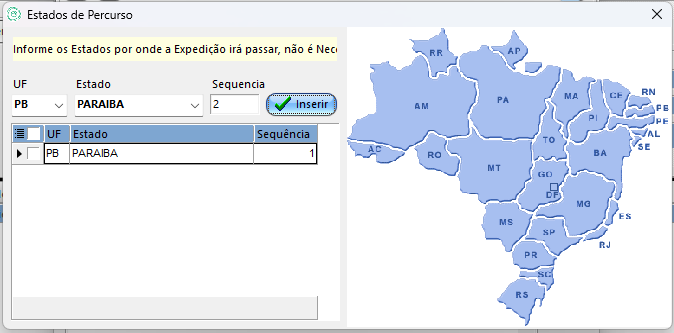
3. <span style="font-size: 12.0pt; font-family: 'Times New Roman',serif; mso-fareast-font-family: 'Times New Roman'; mso-font-kerning: 0pt; mso-ligatures: none; mso-fareast-language: PT-BR;">Caso os estados informados **não sejam fronteiriços**, registre o percurso:</span>

- <span style="font-size: 12.0pt; font-family: 'Times New Roman',serif; mso-fareast-font-family: 'Times New Roman'; mso-font-kerning: 0pt; mso-ligatures: none; mso-fareast-language: PT-BR;">Clique no botão **"Percurso"** e adicione os estados intermediários da rota.</span>
- <span style="font-size: 12.0pt; font-family: 'Times New Roman',serif; mso-fareast-font-family: 'Times New Roman'; mso-font-kerning: 0pt; mso-ligatures: none; mso-fareast-language: PT-BR;">Clique em **"Salvar"** e depois em **"OK"**.</span>

[![image.png](http://olimpustecnologia.2ti.com.br/uploads/images/gallery/2025-04/scaled-1680-/M5Pimage.png)](http://olimpustecnologia.2ti.com.br/uploads/images/gallery/2025-04/M5Pimage.png)

<span style="font-size: 12.0pt; font-family: 'Times New Roman',serif; mso-fareast-font-family: 'Times New Roman'; mso-font-kerning: 0pt; mso-ligatures: none; mso-fareast-language: PT-BR;">Caso as Notas Fiscais inseridas sejam para estados diferentes (Ex.: Em uma carga saindo do RN com notas com destino final para PB e PE), deve-se criar dois manifestos. Um para cada Estado.</span>

<div align="center" class="MsoNormal" id="bkmrk--9" style="margin-bottom: .0001pt; text-align: center; line-height: normal;">---

</div>#### **<span style="font-size: 18.0pt; font-family: 'Times New Roman',serif; mso-fareast-font-family: 'Times New Roman'; mso-font-kerning: 0pt; mso-ligatures: none; mso-fareast-language: PT-BR;">4. Vinculação de Notas Fiscais ao MDF-e</span>**

##### **<span style="font-size: 13.5pt; font-family: 'Times New Roman',serif; mso-fareast-font-family: 'Times New Roman'; mso-font-kerning: 0pt; mso-ligatures: none; mso-fareast-language: PT-BR;">Notas de Emissão Própria</span>**

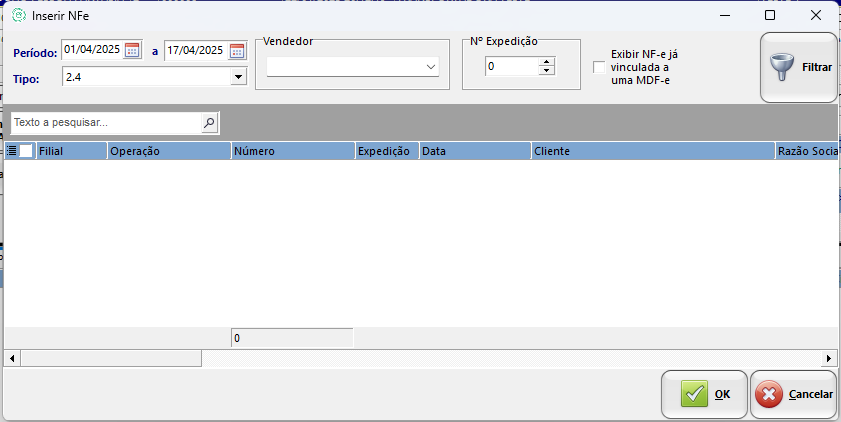
1. <span style="font-size: 12.0pt; font-family: 'Times New Roman',serif; mso-fareast-font-family: 'Times New Roman'; mso-font-kerning: 0pt; mso-ligatures: none; mso-fareast-language: PT-BR;">Clique em **"Inserir NFe"**.</span>

[![image.png](http://olimpustecnologia.2ti.com.br/uploads/images/gallery/2025-04/scaled-1680-/z1Gimage.png)](http://olimpustecnologia.2ti.com.br/uploads/images/gallery/2025-04/z1Gimage.png)

1. <span style="font-size: 12.0pt; font-family: 'Times New Roman',serif; mso-fareast-font-family: 'Times New Roman'; mso-font-kerning: 0pt; mso-ligatures: none; mso-fareast-language: PT-BR;">Filtre as notas fiscais utilizando os seguintes critérios:</span>

- <span style="font-size: 12.0pt; font-family: 'Times New Roman',serif; mso-fareast-font-family: 'Times New Roman'; mso-font-kerning: 0pt; mso-ligatures: none; mso-fareast-language: PT-BR;">Período de Emissão</span>
- <span style="font-size: 12.0pt; font-family: 'Times New Roman',serif; mso-fareast-font-family: 'Times New Roman'; mso-font-kerning: 0pt; mso-ligatures: none; mso-fareast-language: PT-BR;">Tipo de Movimento</span>
- <span style="font-size: 12.0pt; font-family: 'Times New Roman',serif; mso-fareast-font-family: 'Times New Roman'; mso-font-kerning: 0pt; mso-ligatures: none; mso-fareast-language: PT-BR;">Vendedor</span>
- <span style="font-size: 12.0pt; font-family: 'Times New Roman',serif; mso-fareast-font-family: 'Times New Roman'; mso-font-kerning: 0pt; mso-ligatures: none; mso-fareast-language: PT-BR;">Número de Expedição</span>

[![image.png](http://olimpustecnologia.2ti.com.br/uploads/images/gallery/2025-04/scaled-1680-/syAimage.png)](http://olimpustecnologia.2ti.com.br/uploads/images/gallery/2025-04/syAimage.png)

##### **<span style="font-size: 13.5pt; font-family: 'Times New Roman',serif; mso-fareast-font-family: 'Times New Roman'; mso-font-kerning: 0pt; mso-ligatures: none; mso-fareast-language: PT-BR;">Notas Emitidas por Terceiros</span>**

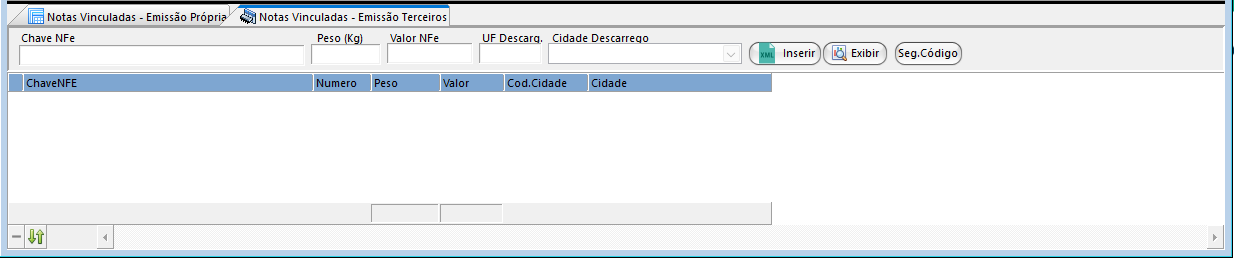
1. <span style="font-size: 12.0pt; font-family: 'Times New Roman',serif; mso-fareast-font-family: 'Times New Roman'; mso-font-kerning: 0pt; mso-ligatures: none; mso-fareast-language: PT-BR;">Acesse a aba **"Notas Vinculadas – Emissão Terceiros"**.</span>
2. <span style="font-size: 12.0pt; font-family: 'Times New Roman',serif; mso-fareast-font-family: 'Times New Roman'; mso-font-kerning: 0pt; mso-ligatures: none; mso-fareast-language: PT-BR;">Preencha os seguintes campos:</span>

- **<span style="font-size: 12.0pt; font-family: 'Times New Roman',serif; mso-fareast-font-family: 'Times New Roman'; mso-font-kerning: 0pt; mso-ligatures: none; mso-fareast-language: PT-BR;">Número da Chave da Nota Fiscal</span>**
- **<span style="font-size: 12.0pt; font-family: 'Times New Roman',serif; mso-fareast-font-family: 'Times New Roman'; mso-font-kerning: 0pt; mso-ligatures: none; mso-fareast-language: PT-BR;">Peso</span>**
- **<span style="font-size: 12.0pt; font-family: 'Times New Roman',serif; mso-fareast-font-family: 'Times New Roman'; mso-font-kerning: 0pt; mso-ligatures: none; mso-fareast-language: PT-BR;">Valor</span>**
- **<span style="font-size: 12.0pt; font-family: 'Times New Roman',serif; mso-fareast-font-family: 'Times New Roman'; mso-font-kerning: 0pt; mso-ligatures: none; mso-fareast-language: PT-BR;">Estado de Descarrego</span>**
- **<span style="font-size: 12.0pt; font-family: 'Times New Roman',serif; mso-fareast-font-family: 'Times New Roman'; mso-font-kerning: 0pt; mso-ligatures: none; mso-fareast-language: PT-BR;">Cidade de Descarrego</span>**
- <span style="font-size: 12.0pt; font-family: 'Times New Roman',serif; mso-fareast-font-family: 'Times New Roman'; mso-font-kerning: 0pt; mso-ligatures: none; mso-fareast-language: PT-BR;">Clique em **"Inserir"**.</span>

[![image.png](http://olimpustecnologia.2ti.com.br/uploads/images/gallery/2025-04/scaled-1680-/DGkimage.png)](http://olimpustecnologia.2ti.com.br/uploads/images/gallery/2025-04/DGkimage.png)

<div align="center" class="MsoNormal" id="bkmrk--13" style="margin-bottom: .0001pt; text-align: center; line-height: normal;">---

</div>#### **<span style="font-size: 18.0pt; font-family: 'Times New Roman',serif; mso-fareast-font-family: 'Times New Roman'; mso-font-kerning: 0pt; mso-ligatures: none; mso-fareast-language: PT-BR;">5. Emissão do MDF-e</span>**

1. <span style="font-size: 12.0pt; font-family: 'Times New Roman',serif; mso-fareast-font-family: 'Times New Roman'; mso-font-kerning: 0pt; mso-ligatures: none; mso-fareast-language: PT-BR;">Após inserir todas as notas fiscais, clique em **"Validar e Transmitir MDF-e"**.</span>
2. <span style="font-size: 12.0pt; font-family: 'Times New Roman',serif; mso-fareast-font-family: 'Times New Roman'; mso-font-kerning: 0pt; mso-ligatures: none; mso-fareast-language: PT-BR;">Imprima o **Documento Auxiliar do MDF-e (DAMDF-e)**.</span>

---

#### **<span style="font-size: 18.0pt; font-family: 'Times New Roman',serif; mso-fareast-font-family: 'Times New Roman'; mso-font-kerning: 0pt; mso-ligatures: none; mso-fareast-language: PT-BR;">6. Videoaula - Emissão de MDFe</span>**

**<span style="font-size: 18.0pt; font-family: 'Times New Roman',serif; mso-fareast-font-family: 'Times New Roman'; mso-font-kerning: 0pt; mso-ligatures: none; mso-fareast-language: PT-BR;"><span style="font-size: 12.0pt; font-family: 'Times New Roman',serif; mso-fareast-font-family: 'Times New Roman'; mso-font-kerning: 0pt; mso-ligatures: none; mso-fareast-language: PT-BR;">Caso ainda tenha mais alguma dúvida sobre o processo, temos também uma videoaula demonstrando todos os passos citados anteriormente:</span></span>**

  
<iframe allow="accelerometer; autoplay; clipboard-write; encrypted-media; gyroscope; picture-in-picture; web-share" allowfullscreen="allowfullscreen" frameborder="0" height="445" src="https://www.youtube.com/embed/tnyNhgAcdgU?si=19yzFSRQTVSLMCyp" style="width: 796px; height: 445px;" title="YouTube video player" width="796"></iframe>

---

# Expedição Pré Venda

[![image.png](http://conhecimento.olimpustecnologia.com.br/uploads/images/gallery/2025-05/scaled-1680-/ojCimage.png)](http://conhecimento.olimpustecnologia.com.br/uploads/images/gallery/2025-05/ojCimage.png)

### ****Expedição****

---

#### ****Expedição de Vendas: Rota de Entrega****

A funcionalidade de Rota de Entrega no ERP CRONOS permite organizar e otimizar as entregas de produtos aos clientes, melhorando a logística e o atendimento.

---

#### ****✅ Passo a Passo para Utilização da Expedição Pré Venda****

1. ****Acesse o Módulo Estoque &amp; Faturamento****
    - <span style="white-space: pre-wrap;">No menu principal, vá até </span>****Faturamento - Controle expdição - Pré Venda****
2. ****Crie uma Nova Rota****
    - <span style="white-space: pre-wrap;">Clique em </span>****Nova Expedição****
    - Informe os dados necessários, como nome da rota, veículo, motorista e data prevista.
3. ****Adicione Pedidos à Expedição****
    - Selecione os pedidos de venda que serão incluídos .
4. ****Organize a Sequência de Entregas****
    - Defina a ordem das entregas para otimizar o trajeto.
    - Utilize ferramentas de geolocalização, se disponíveis, para melhor planejamento.
5. ****Finalize e Imprima a Rota****
    - Após revisar todas as informações, finalize a rota.
    - Imprima os documentos necessários, como romaneios e etiquetas.

---

#### ****📝 Dicas Importantes****

- ****Atualização de Dados****: Mantenha os cadastros de clientes e endereços sempre atualizados para evitar erros nas entregas.
- ****Comunicação com Motoristas****: Utilize o sistema para enviar informações e atualizações aos motoristas responsáveis.
- ****Análise de Desempenho****: Após a conclusão das rotas, analise os resultados para identificar possíveis melhorias na logística.

---

<span style="white-space: pre-wrap;">Para uma demonstração visual detalhada, assista à vídeo-aula completa🎥 </span>[Expedição de Vendas com Rota de Entrega no ERP Cronos](https://youtu.be/3Osy2BWFskc?si=C9YcLxqs30LOPYyI)

<iframe allow="accelerometer; autoplay; clipboard-write; encrypted-media; gyroscope; picture-in-picture; web-share" allowfullscreen="" height="498" src="https://www.youtube.com/embed/3Osy2BWFskc?si=P198wF0jyH39E4Wm" title="YouTube video player" width="885"></iframe>