# Manutenção - Cadastrar Funcionários

[![image.png](http://conhecimento.olimpustecnologia.com.br/uploads/images/gallery/2025-05/scaled-1680-/GuKimage.png)](http://conhecimento.olimpustecnologia.com.br/uploads/images/gallery/2025-05/GuKimage.png)

#### **<span style="font-size: 18.0pt; font-family: 'Times New Roman',serif; mso-fareast-font-family: 'Times New Roman'; mso-font-kerning: 0pt; mso-ligatures: none; mso-fareast-language: PT-BR;">1. Cadastro de Funcionários</span>**

##### **<span style="font-size: 13.5pt; font-family: 'Times New Roman',serif; mso-fareast-font-family: 'Times New Roman'; mso-font-kerning: 0pt; mso-ligatures: none; mso-fareast-language: PT-BR;">Acesso ao Cadastro</span>**

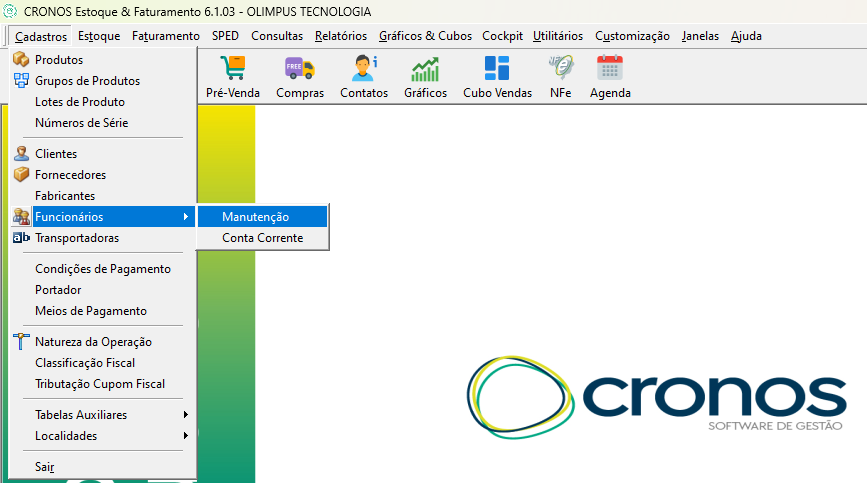
1. <span style="font-size: 12.0pt; font-family: 'Times New Roman',serif; mso-fareast-font-family: 'Times New Roman'; mso-font-kerning: 0pt; mso-ligatures: none; mso-fareast-language: PT-BR;">No menu principal, acesse:</span>

- **<span style="font-size: 12.0pt; font-family: 'Times New Roman',serif; mso-fareast-font-family: 'Times New Roman'; mso-font-kerning: 0pt; mso-ligatures: none; mso-fareast-language: PT-BR;">Cadastros &gt; Funcionários &gt; Manutenção</span>**

[![image.png](http://conhecimento.olimpustecnologia.com.br/uploads/images/gallery/2025-05/scaled-1680-/dedimage.png)](http://conhecimento.olimpustecnologia.com.br/uploads/images/gallery/2025-05/dedimage.png)

##### **<span style="font-size: 13.5pt; font-family: 'Times New Roman',serif; mso-fareast-font-family: 'Times New Roman'; mso-font-kerning: 0pt; mso-ligatures: none; mso-fareast-language: PT-BR;">Cadastro de Novo Funcionário</span>**

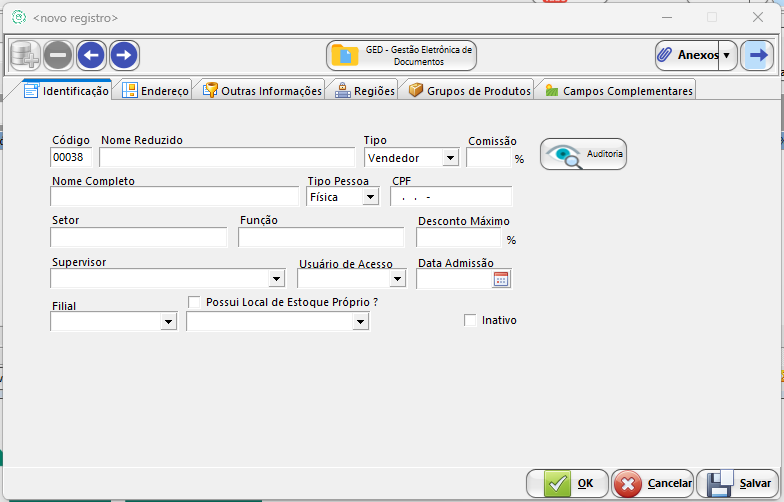
1. <span style="font-size: 12.0pt; font-family: 'Times New Roman',serif; mso-fareast-font-family: 'Times New Roman'; mso-font-kerning: 0pt; mso-ligatures: none; mso-fareast-language: PT-BR;">Na tela "Funcionários", clique no ícone **"Inserir"** localizado no canto superior esquerdo.</span>
2. <span style="font-size: 12.0pt; font-family: 'Times New Roman',serif; mso-fareast-font-family: 'Times New Roman'; mso-font-kerning: 0pt; mso-ligatures: none; mso-fareast-language: PT-BR;">Preencha os seguintes campos obrigatórios:</span>

- **<span style="font-size: 12.0pt; font-family: 'Times New Roman',serif; mso-fareast-font-family: 'Times New Roman'; mso-font-kerning: 0pt; mso-ligatures: none; mso-fareast-language: PT-BR;">Nome Reduzido</span>**
- **<span style="font-size: 12.0pt; font-family: 'Times New Roman',serif; mso-fareast-font-family: 'Times New Roman'; mso-font-kerning: 0pt; mso-ligatures: none; mso-fareast-language: PT-BR;">Nome Completo</span>**
- **<span style="font-size: 12.0pt; font-family: 'Times New Roman',serif; mso-fareast-font-family: 'Times New Roman'; mso-font-kerning: 0pt; mso-ligatures: none; mso-fareast-language: PT-BR;">Filial</span>**
- **<span style="font-size: 12.0pt; font-family: 'Times New Roman',serif; mso-fareast-font-family: 'Times New Roman'; mso-font-kerning: 0pt; mso-ligatures: none; mso-fareast-language: PT-BR;">Tipo:</span>**<span style="font-size: 12.0pt; font-family: 'Times New Roman',serif; mso-fareast-font-family: 'Times New Roman'; mso-font-kerning: 0pt; mso-ligatures: none; mso-fareast-language: PT-BR;"> Selecione a função do funcionário em questão.</span>

[![image.png](http://conhecimento.olimpustecnologia.com.br/uploads/images/gallery/2025-05/scaled-1680-/iLFimage.png)](http://conhecimento.olimpustecnologia.com.br/uploads/images/gallery/2025-05/iLFimage.png)

Salve o cadastro.